• Vivosmart HR and Sleep Tracking

    Exercise is good for you. Getting enough sleep is good for you. So why not track the two?

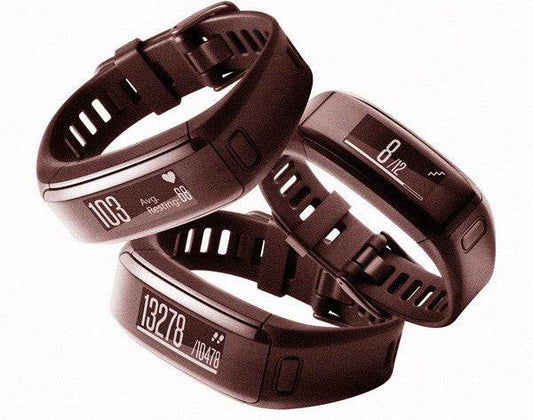
    The new Vivosmart HR from Garmin combines these two vital indicators to paint a picture of health.

    First off, let’s review the benefits of getting some good shut eye (besides keeping you from being super cranky).

    Vivosmart HR from Garmin

    Benefits of Sleep

    • Improved memory
    • Curb Inflammation
    • Spur Creativity
    • Improve Sports Performance
    • Improve grades
    • Increase attention span
    • Regulate digestion
    • Help keep a healthy weight
    • Reduce Stress
    • Prevent traffic accidents
    • Ward off depression

    We don’t need to read the research to know we’ve had a good night's rest, when you’ve slept well you wake up energised and ready to conquer the world (or at least the day).

    Vivosmart HR Sleep Review

    As a very light sleeper, (I’m talking full on blackout blinds, eyemask and earbuds every night) I am always dubious of wearing activity trackers to bed. If it lights up in the night or accidently vibrates, I will wake up. I’ve also found with other activity trackers that I simply find it uncomfortable to keep around my wrist while I try to sleep, particularly if it’s on the larger side.

    The Vivosmart HR is an incredible sleep monitoring tool.

    Firstly, the Vivosmart’s sleek small design means it a) suits my small wrists and b) is very comfortable. I’m able to strap up and forget it’s there. Apart from when it fires off a move alert. When it comes to bedtime, the watch still goes unnoticed and doesn’t bother or alert me whilst sleeping. The watch automatically goes onto ‘do not disturb’ mode and you are left to enjoy your slumber.

    Secondly, you don’t have to remember to set up sleep mode on this watch, like you may do with other models, as the watch automatically detects when you fall asleep and also when you wake up, so there is no extra programming required. When you set up the watch you enter in your regular sleeping and waking times which gives the watch a guideline of the hours to leave you alone, but each night is measured as it comes.

    Upon waking you can review your sleep stats via the Connect App:

    Garmin Connect Sleep

    Garmin Connect Sleep

    Here you can see the breakdown of your last night's sleep. The app reveals the total duration as well as levels of deep and light sleep. You can tell the watch is has accurate sensitivity as you can see the 10 minutes I woke up, fell out of bed and popped to the bathroom.

    Accessing this is great for planning the day's workout as you can increase or reduce intensity based on how rested your body is.

    Garmin Connect Sleep Monitoring

    Garmin Connect Sleep Monitoring

    The Connect app also traces your movement throughout the night, which is interesting, the less movement the better. Here you can see the movement matches the areas of deep and light sleep.

    The Garmin Vivosmart sleep monitoring tool is simple to use, accurate and a very useful training tool.

    To see more reviews of the Garmin Vivosmart feature see here.

    Posted by Victoria Gardner
  • Garmin Vivoactive Activity Tracking Review

    Garmin Vivoactive Activity Tracker Review Sundried

    The Garmin Vivoactive aims to be a winning combination of the Vivofit activity tracker and the Forerunner GPS watches.

    Design

    The Vivoactive watch features a small digital touch screen, with a 3.5cm square face and digital interactive display. It’s small enough to look stylish but big enough that the display can be read clearly, even under direct sunlight. It’s also lightweight weighing in at just 38g, which is light for a GPS watch. The silicone strap is interchangeable and can be swapped if you'd like to change up the look of your watch. As the watch isn’t a heart rate monitor, there’s no need to worry that a customised strap will affect your readings.

    Garmin Vivoactive Smart Watch Lifestyle Tracker

    Garmin Vivoactive Activity Tracking

    The watch is a touch screen with two small buttons either side, one for switching on and off and the other to begin sports activity tracking. One select of the right button will lead to your activity menu, for which there is plenty of choice. Previously Garmin has created good running watches or good activity trackers, the Vivoactive combines them both.

    Steps and Inactivity

    The activity screen displays your daily steps goal, which is calculated automatically. The goal is progressive, so the aim is to gently increase your steps each day, however if you fall short, the watch also regresses your steps to build you back up again and keep your goal achievable. 

    Along the bottom of the step counting screen there is a 'move bar'. This starts clear and then gradually turns red until the watch thinks you need to get up and move. Your first alert comes after just under an hour of inactivity and by the time you’ve reached the fifth bar, you really have been seated for too long. Simply getting up and walking around will clear your bar. Each inactivity alert strikes with a gentle vibration which is a useful tool to help prevent inactivity.

    Automatic sleep detection

    The Vivoactive automatically detects sleep, but this feature can also be triggered manually at any time by tapping your activity screen and selecting start sleep. There are a few things I’ve noticed with the Vivoactive's sleep detection feature. Firstly, when I go to bed without the watch, it thinks that being sat on my dressing table is a perfect night's sleep, and secondly, there is no sleep feedback on the watch itself so it’s hard to know whether it recognised the right time or not. Once opened in the Connect IQ application, users can discover the total duration of their sleep, differentiate between light and deep sleep, and also scroll through a breakdown of their movement.

    Running

    As a running partner, the Vivoactive has two training modes, one for indoor and one for outdoor running. Whilst the trainer lacks a heart rate sensor of its own, it can be linked easily with an external device to enhance the quantity of data feedback from your training. Unless you link with a heart rate monitor you don't get full credit for all the activity you've done. When you enter running mode, a small vibration will alert you when your GPS is ready to track your route. During the run, the screen displays distance, time, pace, lap distance, lap time, heart rate, heart rate zone and average heart rate. The info is easy to tap and scroll through on the move, although I found the screen too small to view my stats at arm's length.

    The indoor running mode brings about the same screen, without the GPS feedback. Users can set up alerts to monitor their heart rate zone or act as reminders throughout their run.

    Cycling

    The watch also has two cycling modes, indoors and outdoors. But again, the difference is only really the GPS settings. The watch itself doesn’t have a cadence measure, however you can connect external devices for a more rounded view of your performance. If you don’t pair any sensors when you're cycling indoors, the watch is basically just a stopwatch, although with sensors it can become so much more, reading speed, cadence, temperature and heart rate.

    Swimming

    The watch is 5 AMT waterproof, meaning you can take it to the pool concern free. Before you start swimming you can customise the length of your pool for accurate tracking and then you’re good to go. A tap of the right button starts your swim by sending a vibration through the watch, which lasts about 3 seconds. The watch reads your laps, distance, strokes and interval count in swim mode.

      Verdict

      Overall I found this was an activity tracker with potential. As a stand alone product, I feel the feedback though good, is quite basic and for more detailed feedback on your workout, you’d need multiple add-on products, such as a heart rate strap, foot pod, bike speed sensor and bike cadence sensor. If you have all of these already, the watch is the perfect tool to consolidate all your data on one easy-to-use device.

      Posted by Alexandra Parren
    • Garmin Forerunner 235 Activity Tracking Review

      Garmin Forerunner 235 Review Activity Tracker Sundried

      The Garmin Forerunner 235 is designed with a purpose, to bring out the best runner in you.

      Appearance

      The watch itself looks more mainstream than most fitness watches, although its plastic strap is a bit of a giveaway. The digital watch face is large and clear measuring 4 cm, with plenty of room for lots of readings to be detailed on the main watch face. The watch's five buttons are streamlined to the watch face but easy to select when needed. Despite its fairly large size, the watch weighs in at just 42g, making it one of Garmin’s lightest watches yet. The watch strap features multiple holes to provide a close fit and despite its large screen does not look as bulky as some of its competitors.

      Garmin Forerunnner 235

      The USB charger features a small bulldog clip, which attaches to the side of the watch face, particularly useful to ensure the watch and charger remain attached even if they get knocked during charging.

      Heart Rate Training

      Starting a training session is easy: you simply select the start button and can then opt for which type of training you will be doing, from running outdoors or running indoors to cycling. The watch finds your heart rate almost immediately without the need to set up so this is a great feature. It was the same with the GPS, in fact, I found that 9/10 times my watch had already vibrated an alert to tell me GPS was ready before I headed outside. Once in training, there were 5 data fields to scroll through, the main being your heart rate screen, which colour codes your reading to your level of intensity. Your heart rate is presented clearly throughout your workout and I found it to be (for the most part) very effective when worn above the wrist bone. Scroll through for distance, time, pace, heart rate zone and lap readings. These are the automatic fields which the watch sets users up with, however as with almost every feature of this watch, these are customisable so the user can view other data such as cadence or temperature. It’s worth experimenting with the features until you find the ones best suited to your training style, with so many there’s bound to be some you find useful.  

      Recovery Time

      Once your workout's complete the watch works it’s magic to estimate the amount of recovery time needed for your body to recuperate from the activity. This is a really useful tool for anyone developing their training routine or even to test the effectiveness of their current habits. By knowing what recovery is required the user can manage their workload accordingly and plan the intensity of their next session to achieve the most benefits from their performance.

      Advanced Training

      When running, users can opt for training intervals or finish time. Training interval workouts are based on distance or time. Wearers can then set their work to rest intervals and for how many repetitions or with an open-ending. This feature is great as it eliminates the need for using a separate app to count your intervals.

      By connecting with Garmin Connect, advanced users can enter a training programme into their workout calendar or even download and follow workouts from the Garmin Connect IQ (which has plenty of choices) via the ‘my workouts’ key on the watch itself.

      Garmin Connect and Garmin Connect IQ

      The Garmin Connect app is simple and easy to use with lots of features to play with. You can check your personal best times, check your health stats, and see how many steps you've done. You can choose which widgets you want displayed on the page and it is fully customisable.

      Garmin Connect Screen

      When exploring the many features of the website, you'll notice your options mimic those in the app, but just with more detail, more widgets and more things to customise. The Connect IQ is one of those pages you think you’ll just have a quick look at and could end up losing yourself for hours on end.

      Garmin Connect Screen

      Move Alerts

      The average adult in the UK spends 7-10 hours of their day seated and research has shown it can lead us to an early grave, with official guidelines concluding it's crucial to supplement long durations of sitting with a short burst of activity. Garmin’s move alerts prompt you with a gentle vibration after long periods of inactivity to get up and get moving. A red bar appears and you must move until the bar disappears, a simple concept that could improve your lifespan. I certainly found the vibrations useful as it’s easy to get engrossed in work and forget to add these bursts of short activity, which ultimately improve your wellbeing.

      Sleep Monitoring

      During the initial profiling of the Garmin, your regular sleeping patterns are entered and from then on the watch is able to monitor your sleep and also stop move notifications continuing whilst you’re not awake. The watch automatically detects between light and deep sleep, as well as the total amount of time spent asleep. This is a great feature to help monitor and perhaps improve performance, with sleep being vital to aid mental and physical fatigue and recovery.

      Sleep Tracking with the Forerunner 235

      Verdict

      If you’ve got the time to master its vast array of data, this watch is almost faultless, providing precise heart rate and so much more. Whilst it is towards the higher price margin for fitness watches retailing at £269.99 on Garmin's website, with this device you get what you pay for. The Forerunner has the quantity of accurate data and the quality of Garmin, global leaders in their field.

      Posted by Alexandra Parren
    • Caffeine and Sleep: Garmin Fenix 3 Sleep Tracking

      Man Taking A Caffeine Nap At His Desk With Coffee In Hand

      After listening to a Stuff You Should Know podcast, I thought I would try a change in my caffeine habits. 

      For sleep tracking, I currently use a Garmin Fenix 3. The Garmin Fenix 3 is a sports watch and activity tracker that does everything you need and more. From dedicated triathlon training to running, step counting, and of course for this test sleep tracking. A recent update from Garmin means you do not need to tell the watch when you go to sleep. It knows! 

      What's required for this test?

      Garmin Fenix 3

      Garmin Fenix 3

      Less Coffee

      And a lot less coffee

      Caffeine Before Sleep

      It takes a regular coffee or tea drinker to know just how tough it is to cut back on the caffeine intake. I thought it would be hard but it was surprisingly easy for me. So why the test? On the podcast, they reminded me that caffeine has a half-life of 6 hours, which means that after 6 hours you still have 50% of the effect in your system. So if you have a caffeinated drink at 3pm and one at 5pm then this is essentially the same as having a full coffee at around 10pm. You may fall asleep with no problems, but your deep sleep will be affected. 

      From Garmin you get a breakdown of deep and light sleep. Plus awake time, so in theory seeing if a 2 week test will make any difference will be fairly easy to measure. 

      Is Caffeine Affecting Your Sleep?

      From my reading on the NHS and various other reputable sites, caffeine may affect your sleep, but not for everyone as everyone's body treats caffeine differently. My results from Garmin in the two weeks leading up to the test were as follows:

      Date Deep Sleep Light Sleep % of Deep Sleep
      1/5/2016 2:40:00 5:08:00 34.19%
      1/6/2016 3:03:00 4:17:00 41.59%
      1/7/2016 2:33:00 4:43:00 35.09%
      1/8/2016 3:28:00 4:16:00 44.83%
      1/9/2016 3:19:00 3:32:00 48.42%
      1/10/2016 4:22:00 6:12:00 41.32%
      1/11/2016 2:33:00 5:21:00 32.28%
      1/12/2016 2:44:00 5:32:00 33.06%
      1/13/2016 2:39:00 5:36:00 32.12%
      1/14/2016 2:26:00 5:20:00 31.33%
      1/15/2016 2:05:00 5:57:00 25.93%
      1/16/2016 3:34:00 5:14:00 40.53%
      1/17/2016 2:38:00 5:26:00 32.64%
      1/18/2016 2:59:00 4:31:00 39.78%
      1/19/2016 2:37:00 4:39:00 36.01%
            36.61%

      The test kicked off with the following rules. Going from 10+ cups of tea and coffee per day up until about 5pm to just one in the morning first thing. No other caffeine. Without other people to compare my stats to, I am just looking for a blame why my deep sleep is just a little over half (but very broken up through the night). 

      So bring on two weeks of sleep tracking with just one cup in the morning.

      Date Deep Sleep Light Sleep % of Deep Sleep
      1/20/2016 2:30:00 4:51:00 34.01%
      1/21/2016 3:35:00 4:42:00 43.26%
      1/22/2016 2:41:00 5:46:00 31.76%
      1/23/2016 3:02:00 4:45:00 38.97%
      1/24/2016 2:31:00 5:10:00 32.75%
      1/25/2016 2:10:00 3:39:00 37.25%
      1/26/2016 2:47:00 5:14:00 34.72%
      1/27/2016 2:26:00 4:50:00 33.49%
      1/28/2016 4:12:00 3:47:00 52.61%
      1/29/2016 2:10:00 5:01:00 30.16%
      1/30/2016 3:14:00 3:50:00 45.75%
      1/31/2016 2:51:00 6:19:00 31.09%
      2/1/2016 2:05:00 5:28:00 27.59%
      2/2/2016 2:11:00 4:01:00 35.22%
            36.33%

      Conclusion.... No change at all! Well at least for me there is no change. 36% of my sleep is deep sleep (according to my trusted Garmin Fenix 3)

      Sleep Data from the Garmin Fenix 3

      From the Garmin Fenix 3 via your phone or their Garmin Connect online account you let the watch know your typical sleep times (most of us have some sort of routine) and the watch will record your sleep.

      Sleep Movement Garmin Fenix 3

      The graph above is the movement during sleep. Garmin will interpret this data into deep and light sleep and that looks like the following.

      Garmin Fenix 3 Light and Deep Sleep Comparison

      Typically activity trackers that monitor your sleep will flag up just how little sleep you have. Read up on sleep and how much you should get. Then you will realise it is important and the deep sleep is what counts. In the chart above deep sleep is represented by the dark navy bars and the light sleep the light blue. Pink is awake time.

      Posted by Daniel Puddick
    • Epson Runsense SF-810 Running Watch Review

      Epson Runsense Running Watch Sundried

      Epson is an electronics company who are one of the world's largest manufacturers of printers, but they're now branching out into the world of wearable technology. The watch reminds me of an early Garmin running watch with its monochrome display and primitive beeping noises like an old school Casio. The watch doesn’t scream 'premium' considering its £179.99 price tag.

      Before trying to connect with any software and apps I thought I would give it a quick charge and take it for some runs. Finding satellites on my old Garmin 910XT was painful; I used to leave it in the garden searching for the GPS before leaving the house. Now with watches like the Garmin Fenix 3 the satellites are typically found within seconds, but on 6 occasions the Epson located the satellites before the Garmin Fenix 3. 

      Epson Runsense SF-810 On Charger Profile Photo

      Epson Runsense SF-810 on charging station

      Battery Life

      When you leave the watch off for any length of time the screen switches off completely which means after 1 week and 7 runs the battery is still at 50%. However, as the watch is not an activity tracker or step counter I found that there is not much point in wearing it throughout the entire day. It has a longer battery life than other watches on the market, but only because it is doing a lot less: no activity tracking, sleep tracking, or step counting.

      Specifics

      With some wrist-based heart rate monitors, it can take 20+ seconds to start displaying your pulse. With the Runsense SF-810, it takes (for me) about 5 seconds on average before heart rate data is displayed. 

      The 4 buttons double up their usage and kicking off a run is very easy. You can skip the searching for GPS info if you just want to get started. And at the end of the run, a press and hold to save the run. All very straight forward.

      At 51g this watch is 10 grams heavier than the Garmin Forerunner 235 which also has wrist-based heart rate capabilities and GPS tracking. The watch face seems quite a bit thicker than the Garmin although when side by side there is not much in it.  

      Watch Weigh In Epson Runsense SF-810


      Epson Runsense SF-810 Vs Garmin Forerunner 235

      Epson Runsense (right) SF-810 side by side with Garmin Forerunner 235 (left)

      Profile Photos of Garmin Forerunnner 235 and Epson Runsense SF-810

      Epson Runsense SF-810 profile photo with Garmin Forerunner 235

      The App and Software

      There is lots of data and information available once you sign up to the software and upload your activities online.

      Heart Rate Data from the Epson Runsense SF-810

      Heart Rate Data from Epson Runsense SF-810 App

      Pitch Data from Epson Runsense SF-810

      Pitch (or cadence) from the Epson Runsense SF-810

      Stride data from Epson Runsense SF-810

      Stride data from Epson Runsense SF-810

      Speed Information from Epson Runsense SF-810

      Speed Information from Epson Runsense SF-810

      Heart Rate Data

      Heart Rate Comparison Epson Runsense SF-810

      The graph above shows an overlay of heart rate data from a tried and tested heart rate monitor and the Epson Runsense SF-810. To get them to match up completely is tricky as the scales are different, but overall they track against each other quite nicely. A few spikes here and there, but this was a run with some intervals chucked in.

      Garmin Forerunner 235 Vs Epson Runsense SF-810

      The Epson is typically cheaper online but there are a few comparable things to consider when buying a running watch. 

      Weight

      The Forerunner is around 10g lighter

      Activity tracking

      The Garmin Forerunner 235 tracks sleep and heart throughout the day. It also has cycle and workout modes whereas the Epson is just a run tracker. 

      Smart notifications

      The Garmin connects via Bluetooth and delivers text messages via a colour display. The Epson sadly does not offer any of this and has a very basic watch display.


      Battery

      The Epson wins hands down here but that's because it is not an all-day activity tracker. The Garmin counts your steps and tracks your heart rate all day long, whereas the Epson is only really good when you're actually running.

      Check out the video below for an even more in-depth review:

      Posted by Daniel Puddick